OTX: Automating Diagnostic Workflows with Open Test Sequences
Open Test sequence eXchange (OTX) standardizes the way diagnostic test procedures are authored, exchanged, and executed. Discover how OTX transforms diagnostic workflow automation.
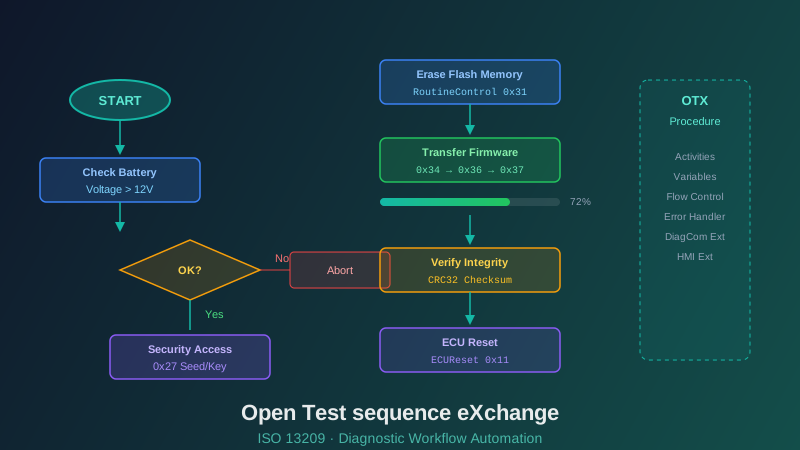
Modern vehicle diagnostics involves far more than sending individual commands to ECUs. Real-world diagnostic operations are complex workflows: sequences of actions with decision points, loops, error handling, and user interactions. Encoding these workflows in a standardized, portable, and executable format is the mission of OTX (Open Test sequence eXchange), standardized as ISO 13209.
The Problem OTX Solves
Consider a typical ECU firmware update procedure. It involves verifying preconditions (battery voltage sufficient, vehicle stationary, ignition on), establishing a diagnostic session, performing security authentication, erasing flash memory, transferring firmware blocks with progress tracking, validating the programmed data, resetting the ECU, and verifying the new firmware version. Each step depends on the result of the previous one. Error conditions at any point require specific recovery actions. And the procedure must work identically whether executed by a workshop technician, a production line system, or a remote update server.
Without OTX, this logic lives in proprietary script engines, compiled code, or worst of all, written instructions for human operators. Porting procedures between tools requires rewriting. Testing and validation are manual processes. And maintaining consistency across versions and platforms is a constant struggle.
OTX Core Concepts
Procedures — The top-level organizational unit. A procedure encapsulates a complete diagnostic workflow, such as "Flash ECU Firmware" or "Perform End-of-Line Test." Procedures can call other procedures, enabling modular design and reuse.
Activities — The building blocks of procedures. Activities include diagnostic service calls (invoking UDS commands via ODX references), flow control (if/else branches, loops, exception handling), user interaction (displaying messages, requesting input), data manipulation (variable assignments, calculations), and timing control (waits, timeouts).
Variables and Parameters — OTX provides a type system for managing data within procedures. Variables hold intermediate results, configuration parameters, and diagnostic responses. Input parameters allow procedures to be customized at runtime without modification.
Extensions — The OTX core specification defines fundamental workflow capabilities. Domain-specific extensions add specialized functionality: DiagCom for diagnostic communication (linking to ODX data), HMI for user interface elements, I/O for hardware interactions, and others.
OTX and ODX: Better Together
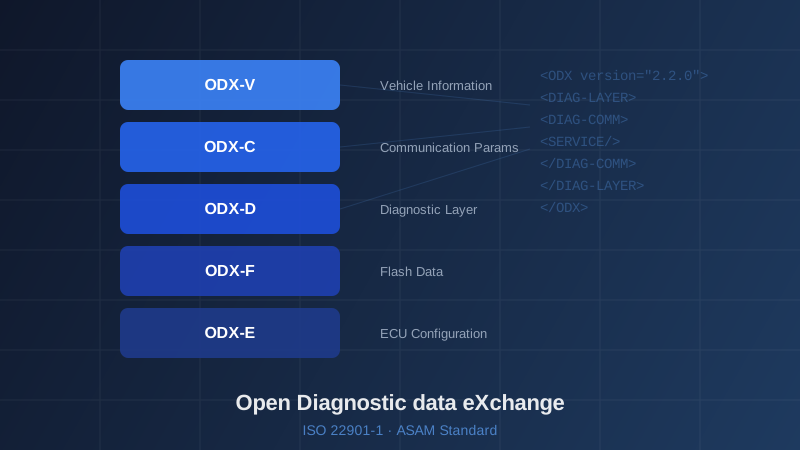
OTX and ODX are designed to work in tandem. ODX describes what an ECU can do (its diagnostic services, parameters, and data). OTX describes how to use those capabilities in a structured workflow. An OTX procedure references ODX diagnostic services by name, and the diagnostic runtime resolves these references to actual communication parameters at execution time. This separation of concerns — data description vs. workflow logic — is a key architectural strength.
Practical Benefits
OTX adoption delivers measurable value. Procedures are portable across different diagnostic runtime environments. Non-programmers (diagnostic engineers, test specialists) can author and modify procedures using graphical OTX editors. Automated testing of diagnostic procedures becomes straightforward — the same OTX procedure can be executed against ECU simulations in CI/CD pipelines. And version management of diagnostic workflows benefits from the same tooling used for any other structured data format.
At Nextera Automotive, we develop OTX authoring tools, runtime engines, and procedure libraries. Our team has deep experience translating complex OEM diagnostic processes into maintainable, standard-compliant OTX procedures.