DoIP: How Ethernet Is Transforming Vehicle Diagnostics
Diagnostics over Internet Protocol (DoIP) brings high-speed Ethernet communication to vehicle diagnostics. Explore ISO 13400, vehicle discovery, routing activation, and the future of connected car diagnostics.
The automotive industry is undergoing a fundamental shift in vehicle networking. While CAN bus has served reliably for decades, the explosion of data-intensive features — advanced driver assistance systems (ADAS), over-the-air updates, and connected car services — demands bandwidth that CAN simply cannot provide. Enter Automotive Ethernet, and with it, DoIP (Diagnostics over Internet Protocol).
Why Ethernet in Vehicles?
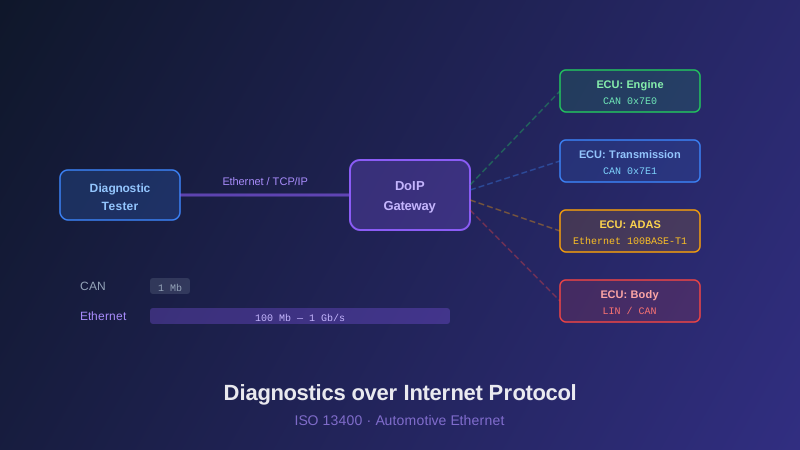
CAN bus operates at a maximum of 1 Mbit/s (or 5 Mbit/s with CAN FD). Automotive Ethernet, based on IEEE 100BASE-T1 and 1000BASE-T1 standards, delivers 100 Mbit/s to 1 Gbit/s over a single unshielded twisted pair. This is not just an incremental improvement — it is a paradigm shift. Flash programming that takes 30 minutes over CAN can be completed in under a minute over Ethernet. Real-time streaming of diagnostic data becomes feasible. And the same physical infrastructure that carries diagnostic traffic can also handle software updates, camera feeds, and V2X communication.
DoIP Protocol Architecture
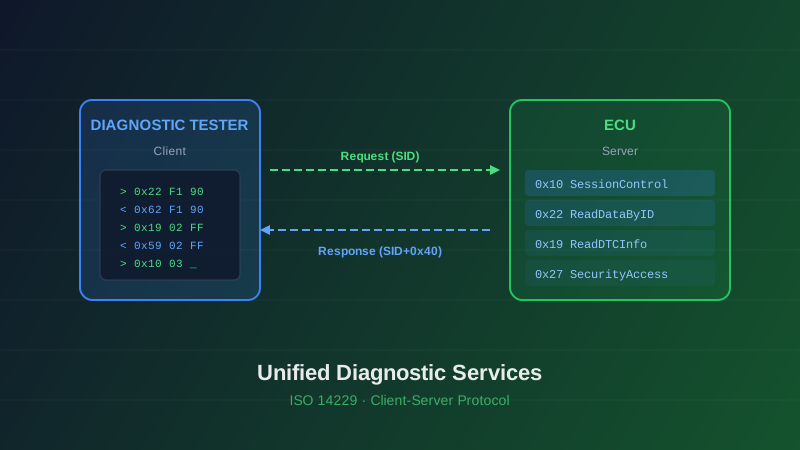
DoIP, standardized as ISO 13400, defines how UDS diagnostic messages are transported over TCP/IP networks. The protocol consists of several key mechanisms:
Vehicle Identification — When a tester connects to the vehicle network, it broadcasts a Vehicle Identification Request. All DoIP-capable ECUs respond with their identification data including VIN, logical address, and network configuration. This enables automatic vehicle and ECU discovery without any prior knowledge.
Routing Activation — Before diagnostic communication can begin, the tester must activate routing on the DoIP gateway. This step establishes a connection context, assigns a source address to the tester, and configures the gateway to route UDS messages between the external tester and internal ECUs.
Diagnostic Message Transport — Once routing is active, UDS messages are encapsulated in DoIP headers and transmitted over TCP. The DoIP gateway handles the translation between Ethernet and internal vehicle bus systems (CAN, FlexRay, LIN), making the entire vehicle network accessible through a single Ethernet connection point.
Implementation Considerations
Implementing a DoIP stack requires attention to several technical details. TCP connection management, including keep-alive mechanisms and graceful disconnect handling, must be robust. The tester must handle the asynchronous nature of vehicle identification — multiple responses may arrive at different times. DoIP message framing requires proper header parsing and payload length validation to prevent protocol errors.
Security is another critical dimension. DoIP inherits the TCP/IP stack's vulnerability surface, making TLS encryption and authentication mechanisms essential for production deployments. The upcoming ISO 13400 amendments address these concerns with enhanced security profiles.
The Road Ahead
As vehicle architectures evolve toward centralized computing platforms and zone-based topologies, Ethernet becomes the natural backbone. DoIP will evolve alongside these architectures. SOVD (Service-Oriented Vehicle Diagnostics), the next generation of vehicle diagnostic access, builds directly on IP-based communication and RESTful APIs — making DoIP expertise the foundation for tomorrow's diagnostic infrastructure.
At Nextera Automotive, our DoIP implementation supports the complete ISO 13400 feature set. We help OEMs and tier suppliers build diagnostic systems that leverage Ethernet's full potential while maintaining backward compatibility with CAN-based architectures.